
Asynchronous Multi Threaded and Parallel Programming in .NET
 Photo from Unsplash
Originally Posted On: https://medium.com/@darshana-edirisinghe/asynchronous-multi-threaded-and-parallel-programming-in-net-25d46eb2d28e
This article will cover the fundamentals of asynchronous programming in .NET, including the use of async and await keywords, the role of tasks, and how they interact with the thread pool. We will explore practical examples demonstrating asynchronous methods, handling exceptions in asynchronous code, and improving performance with parallel programming. Additionally, we’ll discuss best practices for writing efficient asynchronous code and common pitfalls to avoid. By the end of this article, you’ll have a solid understanding of how to implement asynchronous programming in your .NET applications.
Asynchronous Programming
Asynchronous programming in .NET allows a program to perform tasks without blocking the main thread, enabling the program to remain responsive. This is particularly useful for tasks that might take some time, such as file I/O operations, network requests, or any other long-running processes.
Key Concepts of Asynchronous Programming in .NET:
- Async and Await: These are keywords used to define asynchronous methods.
async: Used to declare a method as asynchronous.await: Used to pause the execution of an async method until the awaited task completes.
2. Tasks: Represents an asynchronous operation. The Task class is used to handle and control these operations.
Relation to the Thread Pool
Thread Pool
A collection of threads managed by .NET to perform background tasks. Instead of creating a new thread every time an asynchronous task is performed, .NET uses threads from this pool to optimize performance.
When you use async and await, the method doesn’t block the main thread. Instead, it runs on a thread from the thread pool. Once the awaited task completes, it returns to the context it was called from, which is often the main thread.
Execution
public async Task<int> FetchDataCountAsync(){ // 1. Call a synchronous method to get all products. // This runs on the current thread. var products = productService.GetAll(); // 2. Calculate the length of the products array. // This also runs on the current thread. var productLength = products.length(); // 3. Call an asynchronous method to get all categories. // This does not block the current thread. // The control returns to the caller until this task is completed. var categories = await catService.GetAll(); // The method pauses here until catService.GetAll() completes. // Once completed, the result is assigned to the 'categories' variable. // 4. Calculate the length of the categories array. // This runs on the current thread after the await completes. var catLength = categories.Length(); // 5. Call an asynchronous method to get all limits. // This does not block the current thread. // The control returns to the caller until this task is completed. var limits = await limitService.getAll(); // The method pauses here until limitService.getAll() completes. // Once completed, the result is assigned to the 'limits' variable. // 6. Calculate the length of the limits array. // This runs on the current thread after the await completes. var limitLength = limits.length(); // 7. This runs on the current thread. return productLength + catLength + limitLength;}Explanation
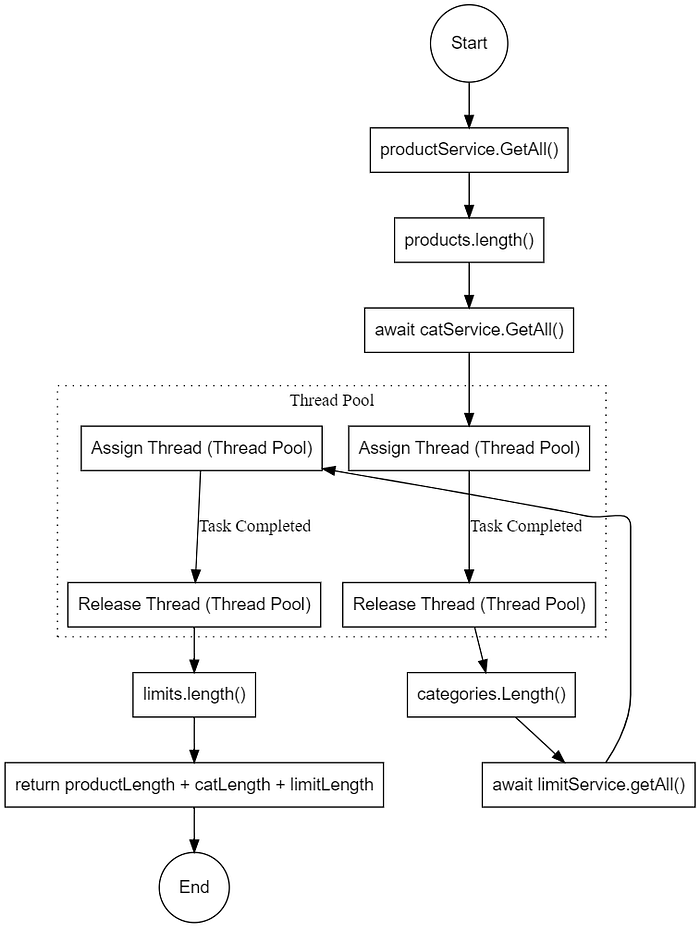
Real-World Application: PDF Generation
Let’s see how these async concepts apply to a common real-world scenario — generating PDF documents. PDF generation is an I/O-intensive operation that benefits greatly from asynchronous programming. IronPDF, a C# PDF library, provides async methods for HTML to PDF conversion, demonstrating exactly why we use async/await:
public async Task<byte[]> GenerateInvoicePdfAsync(string invoiceHtml){ // Create renderer - this runs synchronously var renderer = new ChromePdfRenderer(); // Convert HTML to PDF asynchronously // This doesn't block the thread while the Chrome engine renders var pdf = await renderer.RenderHtmlAsPdfAsync(invoiceHtml); // The method pauses here until rendering completes // Once done, we can process the result return pdf.BinaryData;}Notice how this follows the same pattern as our earlier example. The PDF rendering happens on a thread from the thread pool, allowing the main thread to remain responsive. This is particularly important when generating multiple PDFs — which we’ll explore further when we discuss parallel programming with Task.WhenAll and Parallel.ForEach later in this article.
This HTML to PDF converter demonstrates why async programming matters: without it, your application would freeze while generating each PDF, creating a poor user experience. Explore IronPDF 30-day trial here.
Asynchronous vs Synchronous
In .NET, synchronous methods typically do not directly interact with the thread pool unless they explicitly use it, such as via Task.Run or ThreadPool.QueueUserWorkItem. By default, synchronous methods run on the current thread that calls them. However, you can use the thread pool to run synchronous methods in a background thread, thus freeing up the main thread.
Execution
public int FetchDataSync(){ // 1. Call to get all products. // This runs on the current thread and blocks until it completes. var products = productService.GetAll(); // 2. Calculate the length of the products array. // This runs on the current thread after the previous line completes. var productLength = products.length(); // 3. Call to get all categories. // This runs on the current thread and blocks until it completes. var categories = catService.GetAll(); // 4. Calculate the length of the categories array. // This runs on the current thread after the previous line completes. var catLength = categories.Length(); // 5. Call to get all limits. // This runs on the current thread and blocks until it completes. var limits = limitService.getAll(); // 6. Calculate the length of the limits array. // This runs on the current thread after the previous line completes. var limitLength = limits.length(); // 7. This runs on the current thread after the previous lines complete. return productLength + catLength + limitLength;}Explanation

Multi-Threaded Programming
Multi-threaded programming in C# involves creating and managing multiple threads within a single application. This allows the application to perform multiple tasks concurrently, improving performance and responsiveness, especially on multi-core processors.
Key Concepts
- Thread: The smallest unit of a process that can be scheduled for execution. In C#, you can create and manage threads using the
Threadclass. - Thread Pool: A pool of worker threads managed by the .NET Framework. It handles thread creation and management, which helps improve performance and resource management.
- Task: A higher-level abstraction over threads. Tasks are part of the Task Parallel Library (TPL) and provide a more efficient and easier way to work with asynchronous operations.
Scenario 1: No dependencies between thread results
using System;using System.Threading;class Program{ static void Main() { // Create three threads Thread thread1 = new Thread(new ThreadStart(Activity1)); Thread thread2 = new Thread(new ThreadStart(Activity2)); Thread thread3 = new Thread(new ThreadStart(Activity3)); // Start the threads thread1.Start(); thread2.Start(); thread3.Start(); // Wait for threads to complete thread1.Join(); thread2.Join(); thread3.Join(); Console.WriteLine("All activities completed."); } static void Activity1() { } static void Activity2() { } static void Activity3() { }}Scenario 2: Dependencies between thread results
The output of Thread 1 is required to start Thread 2. Use a simple synchronization mechanism using ManualResetEvent to signal between threads.
using System;using System.Threading;class Program{ static ManualResetEvent activity1Completed = new ManualResetEvent(false); static string sharedData; static void Main() { // Create three threads Thread thread1 = new Thread(new ThreadStart(Activity1)); Thread thread2 = new Thread(new ThreadStart(Activity2)); Thread thread3 = new Thread(new ThreadStart(Activity3)); // Start the threads thread1.Start(); thread2.Start(); thread3.Start(); // Wait for threads to complete thread1.Join(); thread2.Join(); thread3.Join(); Console.WriteLine("All activities completed."); } static void Activity1() { // Set shared data and signal completion sharedData = "Data from Activity 1"; activity1Completed.Set(); } static void Activity2() { // Wait for Activity 1 to complete activity1Completed.WaitOne(); // Implementation var Act1Results = sharedData; } static void Activity3() { }}Scenario 3: Handle Exceptions
using System;using System.Threading;using System.Threading.Tasks;class Program{ static CancellationTokenSource cts = new CancellationTokenSource(); static void Main() { // Create and start tasks Task task1 = Task.Run(() => Activity1(cts.Token), cts.Token); Task task2 = Task.Run(() => Activity2(cts.Token), cts.Token); Task task3 = Task.Run(() => Activity3(cts.Token), cts.Token); try { // Wait for all tasks to complete Task.WaitAll(task1, task2, task3); } catch (AggregateException ex) { // Handle the exception foreach (var innerEx in ex.InnerExceptions) { Console.WriteLine($"Exception: {innerEx.Message}"); } // Revert changes here RevertChanges(); // Signal that the tasks were cancelled Console.WriteLine("All activities stopped and changes reverted."); } } static void Activity1(CancellationToken token) { try { throw new Exception("Error in Activity 1"); } catch (Exception ex) { cts.Cancel(); // Cancel all tasks throw; // Re-throw the exception to be caught by Task.WaitAll } } static void Activity2(CancellationToken token) { try { } catch (OperationCanceledException) { Console.WriteLine("Activity 2 cancelled."); } } static void Activity3(CancellationToken token) { try { } catch (OperationCanceledException) { Console.WriteLine("Activity 3 cancelled."); } } static void RevertChanges() { // Implement the logic to revert changes here Console.WriteLine("Reverting changes..."); }}Task Paralel Library(TPL)
TPL is a set of public types and APIs in the System.Threading.Tasks namespace that allows you to easily write parallel and asynchronous code. Here are some key features and benefits of TPL:
1. Creating and Starting Tasks
using System;using System.Threading.Tasks;class Program{ static void Main(string[] args) { Task task = Task.Run(() => { // Your code here Console.WriteLine("Task is running."); }); task.Wait(); // Waits for the task to complete }}2. Returning Results from Tasks
using System;using System.Threading.Tasks;class Program{ static void Main(string[] args) { Task<int> task = Task.Run(() => { // Your code here return 42; }); int result = task.Result; // Blocks and gets the result Console.WriteLine($"Result: {result}"); }}3. Asynchronous Programming with async and await
using System;using System.Threading.Tasks;class Program{ static async Task Main(string[] args) { int result = await GetNumberAsync(); Console.WriteLine($"Result: {result}"); } static Task<int> GetNumberAsync() { return Task.Run(() => { // Simulate work Task.Delay(2000).Wait(); return 42; }); }}4. Parallel Programming with Parallel Class
using System;using System.Threading.Tasks;class Program{ static void Main(string[] args) { Parallel.For(0, 10, i => { Console.WriteLine($"Processing {i}"); }); string[] words = { "one", "two", "three" }; Parallel.ForEach(words, word => { Console.WriteLine($"Processing {word}"); }); }}5. Continuation Tasks
Tasks can be chained together using continuation tasks.
using System;using System.Threading.Tasks;class Program{ static void Main(string[] args) { Task task = Task.Run(() => { Console.WriteLine("Initial task."); }); task.ContinueWith(t => { Console.WriteLine("Continuation task."); }).Wait(); }}6. Exception Handling in Tasks
using System;using System.Threading.Tasks;class Program{ static void Main(string[] args) { Task task = Task.Run(() => { throw new InvalidOperationException("Something went wrong."); }); try { task.Wait(); } catch (AggregateException ex) { foreach (var innerEx in ex.InnerExceptions) { Console.WriteLine(innerEx.Message); } } }}7. Task.WaitAll and Task.WhenAll
Wait for multiple tasks to complete using Task.WaitAll and Task.WhenAll
using System;using System.Threading.Tasks;class Program{ static async Task Main(string[] args) { Task task1 = Task.Run(() => Task.Delay(1000)); Task task2 = Task.Run(() => Task.Delay(2000)); // Blocking wait Task.WaitAll(task1, task2); // Async wait await Task.WhenAll(task1, task2); }}Task.WaitAll: Blocks until all tasks complete.Task.WhenAll: Returns a task that completes when all tasks complete.
8. Task.WaitAny and Task.WhenAny
Wait for any one of multiple tasks to complete using Task.WaitAny and Task.WhenAny.
using System;using System.Threading.Tasks;class Program{ static async Task Main(string[] args) { Task task1 = Task.Run(() => Task.Delay(1000)); Task task2 = Task.Run(() => Task.Delay(2000)); // Blocking wait int index = Task.WaitAny(task1, task2); Console.WriteLine($"Task {index + 1} completed first."); // Async wait Task firstTask = await Task.WhenAny(task1, task2); Console.WriteLine("First task completed."); }}Task.WaitAny: Blocks until any one of the tasks completes.Task.WhenAny: Returns a task that completes when any one of the tasks completes.
9. Cancellation of Tasks
using System;using System.Threading;using System.Threading.Tasks;class Program{ static async Task Main(string[] args) { CancellationTokenSource cts = new CancellationTokenSource(); Task task = Task.Run(() => { for (int i = 0; i < 10; i++) { if (cts.Token.IsCancellationRequested) { Console.WriteLine("Task cancelled."); return; } Task.Delay(1000).Wait(); Console.WriteLine($"Task running {i}"); } }, cts.Token); await Task.Delay(3000); cts.Cancel(); await task; }}Information contained on this page is provided by an independent third-party content provider. XPRMedia and this Site make no warranties or representations in connection therewith. If you are affiliated with this page and would like it removed please contact [email protected]
